Welcome
Guest
, you are in:
<root>
Admin
Business
Development
Support
•
Login
ComCept Documentation
Navigation

Main Page
All Pages
Categories
Internal
Search the wiki
»
Discuss (0)
History
Attachments
Mobile Inventory Flow and Process
Print
Create and Edit Batches
Templates
Document Upload in Document Generation
CollisionLinx Orders Help Documentation
CollisionLinx Login Documentation
CollisionLinx Orders Help Documentation
Create and Edit Batches
Templates
Document Upload in Document Generation
(10)
»
Task Manager Help Documentation
»
Document Generation (Doc Gen)
»
Mobile Inventory Flow and Process
[X]
»
CollisionLinx Inventory Help Documentation
»
Receive PO Help Documentation
»
CollisionLinx Help Documentation
»
CollisionLinx Count Sheets Help Documentation
»
Flow chart of all the documents in Legacy
»
Manufacture Batch Documentation
»
Time Clock - Batch screen
»
Task Manager Help Documentation
»
Document Generation (Doc Gen)
»
Mobile Inventory Flow and Process
Table of Contents
[
Hide/Show
]
Receiving Flow and Process
WMS Warehouse
WMS Store
Receiving Flow and Process

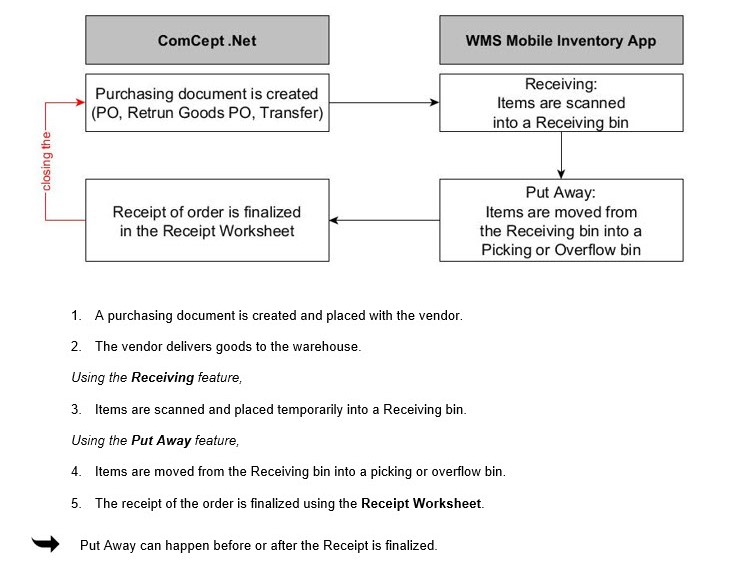
WMS Warehouses use a two step-process to receive goods.
1. Items are received temporarily into a Receiving bin
2. Items are moved from the Receiving bin into a pocking or overflow bin.
WMS Warehouse

WMS Store

Name
Size
ReceivingStoreFlowProcess.jpg
59.73 KB
ReceivingWhseFlowProcess.jpg
78.39 KB
Copyright © 2000 - 2025 - ComCept Solutions, LLC