Welcome
Guest
, you are in:
<root>
Admin
Business
Development
Support
•
Login
ComCept Documentation
Navigation

Main Page
All Pages
Categories
Internal
Search the wiki
»
Discuss (0)
History
Attachments
Mobile Inventory Flow and Process
Print
Security Levels
CollisionLinx Login Documentation
CollisionLinx Orders Help Documentation
Customer Count Sheet Help Documentation
Mobile Suite - Count Sheets Help Documentation
Notes: Customers
Notes: Master Inventory
Notes: Vendors / Manufacturers
WO Processing Help Documentation
Work Order Auto-reduce Quantity To Pick
Work Order Find Open Orders
Security Levels
(10)
»
Security Changes 2018
»
Multi-User Count Sheet Guide
»
Mobile Inventory Flow and Process
[X]
»
Price Lookup Help Documentation
»
Work Order Help Documentation
»
Time Clock - Intro, Security, Accessing the Functions
»
Notes Menu
»
Customer Inventory Help Documentation
»
CollisionLinx Help Documentation
»
Shipping Worksheet
»
Security Changes 2018
»
Multi-User Count Sheet Guide
»
Mobile Inventory Flow and Process
Table of Contents
[
Hide/Show
]
Receiving Flow and Process
WMS Warehouse
WMS Store
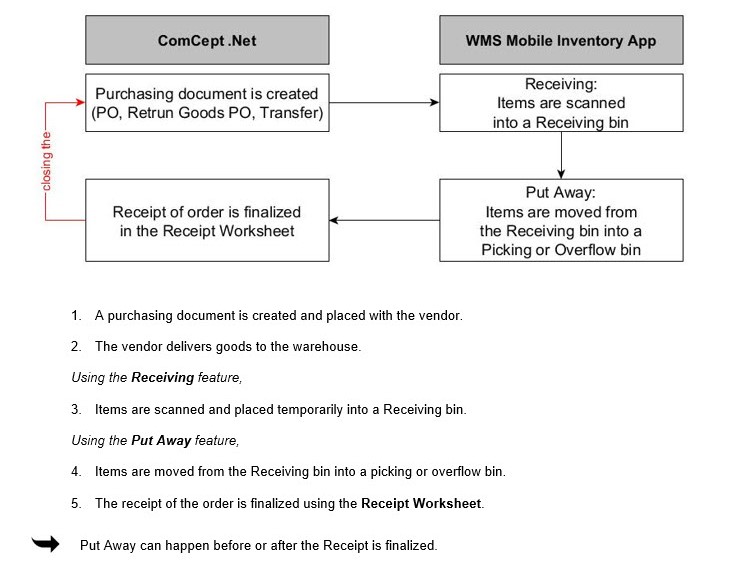
Receiving Flow and Process

WMS Warehouses use a two step-process to receive goods.
1. Items are received temporarily into a Receiving bin
2. Items are moved from the Receiving bin into a pocking or overflow bin.
WMS Warehouse

WMS Store

Name
Size
ReceivingStoreFlowProcess.jpg
59.73 KB
ReceivingWhseFlowProcess.jpg
78.39 KB
Copyright © 2000 - 2025 - ComCept Solutions, LLC